




Bello Pro: how does it work?
Short introduction to the Advanced Layout Features of Bello Pro
Bello are 2 separate OpenType fonts (.otf), Bello Script and Bello Caps. Bello Script Pro contains many Advanced OpenType Features, which makes it for example easy to automatically implement all the ligatures of Bello. But there is more to Bello Script Pro. And if you wanna hit Bello Pro hard, you can even automatically replace some words in your text by the pre-designed word logotypes.
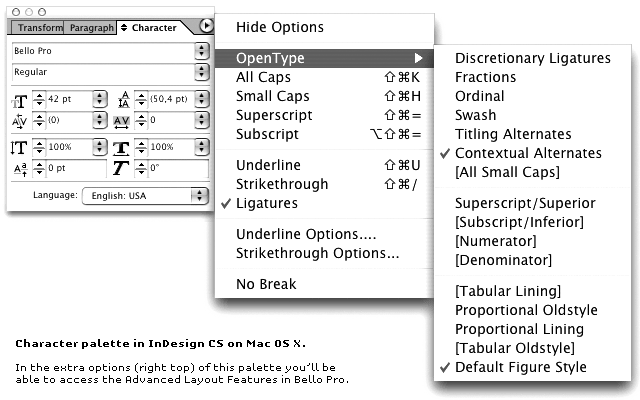
Visual overview of the different features

All ligatures get automatically replaced if the 'Ligature' feature is activated.

With the 'Contextual Alternates' feature activated some characters look different depending on their context. In this example the 'y' looks different, because it's followed by a space instead of another character.

If you wanna hit Bello Pro hard, activate the 'Discretionary Ligatures' feature. Some words in your text will be automatically be replaced by pre-designed word-logotypes.

Standard the font has a Default Figure Style.

Switching to Fractions replaces standard combinations like '1/2', '1/4 or '3/4' to real fractions.

Next to these, also the 'Ordinal' and 'Superior/Superscript' features are included in Bello Script Pro.
You wanna pump up the look of the beginning or end of your words?

Find alternatives for first characters in the Titling Alternates feature.

The Swash feature gives you various kind of swashes at the end of a word.

Note: of course, manual placement of all different kind of swashes is also possible. In that case you're not bounded to these two features.
In most applications (like InDesign CS and Photoshop CS) the 'Ligatures' & 'Contextual Alternates' features are activated by default. Bello Script Pro will standard look like this if you don't touch any of the fancy OpenType features in the Character Palette:


